Admin
03/12/2025
Share
**BeLight Live Home 3D Pro MacOs – Thiết kế nội thất nhà hướng đến khách hàng cá nhân**
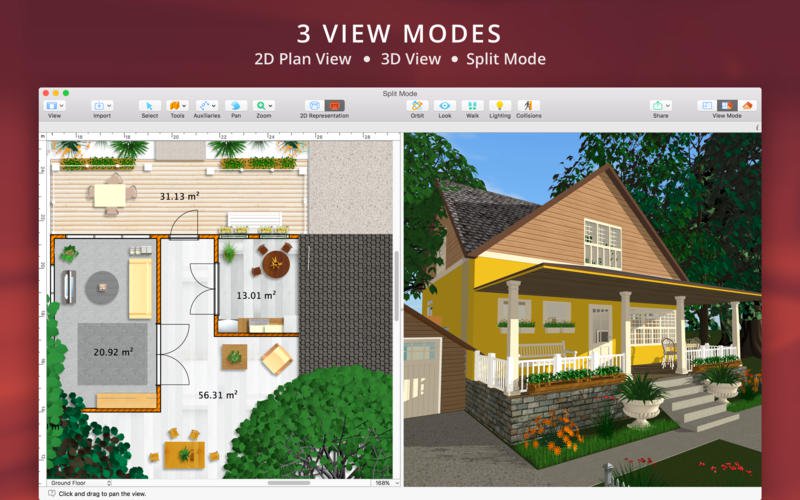
✨ Biến ước mơ về ngôi nhà hoàn hảo thành hiện thực với BeLight Live Home 3D Pro dành cho macOS! 🏡 Phần mềm thiết kế nội thất 3D mạnh mẽ và trực quan này mở ra thế giới sáng tạo, giúp bạn dễ dàng phác thảo không gian sống lý tưởng, từ những bản vẽ 2D chi tiết đến những mô hình 3D sống động như thật. 🎨
Phần mềm BeLight Live Home 3D Pro mang đến trải nghiệm thiết kế đỉnh cao cho mọi người dùng cá nhân. 🌟 Bạn có thể tự do sáng tạo, bố trí nội thất, lựa chọn vật liệu và màu sắc, thậm chí là “đi dạo” trong chính ngôi nhà tương lai của mình ngay trên màn hình Mac. 🚶♀️🚶♂️ Với thư viện khổng lồ gồm hơn 2.000+ mô hình đồ nội thất và 2.100+ vật liệu, cùng khả năng tùy chỉnh mái nhà và địa hình, Live Home 3D Pro là công cụ đắc lực để bạn thể hiện phong cách độc đáo. 🌳
**Yêu cầu hệ thống:**
* **Phiên bản macOS:** Yêu cầu **macOS 10.15 trở lên** để cài đặt và sử dụng mượt mà. 💻
* **Cấu hình tối thiểu:** Bộ xử lý **Apple Silicon hoặc Intel Core**, dung lượng ổ cứng trống khoảng **615 MB** và RAM đủ để chạy ứng dụng. ⚙️
Hãy bắt đầu hành trình kiến tạo không gian sống mơ ước của bạn ngay hôm nay! ✨🚀
Live Home 3D, là phần mềm kế thừa các tính năng của Live Interior 3D là phần mềm mạnh mẽ nhưng trực quan cho thiết kế nội thất gia đình cho phép bạn xây dựng ngôi nhà ước mơ ngay trên máy Mac của bạn.Không có vấn đề nếu bạn là chủ nhà đang lên kế hoạch cải tiến nhà tiếp theo hoặc nhà thiết kế nội thất chuyên nghiệp cố gắng thu hẹp khoảng cách giữa ý tưởng và mô hình 3D hiện thực hơn.Live Home 3D có thể giúp bạn.
Chi tiết tính năng:
Interesting facts about this article
Nhấn để xem chi tiết
General
- Create detailed 2D floor plans.
- Beautiful real-time 3D rendering.
- Unlimited floor levels. (Pro edition only)
- A collection of in-depth video tutorials.
- Built-in Help Assistant and free, quick tech support service.
- Project Gallery with house projects and sample rooms.
- Native Support for Live Interior 3D Projects.
Floor Plan Tools
- Draw complete rooms using Room tool.
- Use Arc and Straight Wall tools for drawing walls.
- Elevation view. (Pro edition only)
- ‘Auto outline’ vector-based 2D representation for furniture.
- View real-time measurements for walls, ceilings, and floors when drawing in 2D Plan view.
- Select the necessary measurement units (inches, feet, meters, etc).
- Use smart Dimension tool to set the distance between underlying objects or walls.
- Precise positioning thanks to smart guides and object snapping.
Real-Time 3D Environment
- Adjust the lighting, add and move objects, apply materials, and more right in 3D.
- All changes, made in 3D or 2D, are rendered in 3D in real time.
- Walk through your 3D interior.
- FOV (field of view) and parallel camera projection. (Pro edition only)
- Set multiple cameras to see the house from different point of views.
- Achieve natural lighting by setting up true Geo position, daytime and overcast.
- Adjust light fixtures throughout your project to get realistic lighting scene.
- Light editor helps to add a light source to an imported objects. (Pro edition only)
- Create corner windows and complex openings using the program advanced technology.
- Level of details tool allows to optimize 3D object and speed up the project.
- Professional Shadow Map technique makes shadows look soft and natural.
3D Models and Materials
- 2,000+ furniture and other models.
- Import models seamlessly from Trimble 3D Warehouse™ (previously Google 3D Warehouse™).
- Edit furniture in SketchUp. (Pro edition only)
- 2,100+ supplied materials.
- Drag and drop any image from the Finder to apply it to any surface as custom material.
- Advanced material editor. (Pro edition only)
- Set the exact size of a material tile to know how much of the material is needed for your house renovation project.
- Import objects in SketchUp, COLLADA, KMZ, FBX, OBJ or 3DS formats by simply dragging and dropping them into your project.
- Polygonal-based Block tool for drawing balconies, porches, and more. (Pro edition only)
Roofs and Dormers
- Roof Assistant with 12 customizable roof templates.
- Custom shaped roofs. (Pro edition only)
- Add custom segments to fully customize your roof.
- 16 customizable dormers.
Export and Share the Result
- Share the result to Facebook, Twitter, Vimeo or YouTube.
- Export 3D views to JPEG, TIFF, PNG, and BMP (up to 16000 x 16000).
- Share 360° Panorama JPEG images (up to Ultra HD) to Facebook.
- Render a realistic video walkthrough (up to Ultra HD).
- Create Stereo 3D Video, 360° Video and even Stereo 3D 360° Video.
- Quickly send a copy of your project via Mail, Messages or AirDrop.
- Export the entire project or selected objects to COLLADA, Trimble SketchUp™, VRML Version 2.0 or X3D format.
- Export to 3DS, FBX, USDZ and OBJ formats. (Pro edition only)
What’s New:
Version 4.0:
- Introduced Metal-based rendering for 3D graphics.
- Revised materials receive physically based properties (roughness, metallic, normals).
- New wall type added, Сurtain walls allow creating non-structural walls.
- New project level, Site separates Ground floor level from outdoor, which is convenient for outdoor design.
- Added the ability to rotate and move the whole house or apartment on the 2D plan. Introduced the terrain editing functionality:
- Elevation Point, Elevation Line and Elevation Spline tools assist with creating a landscape identical to the one around your house.
- Added the ability to create cutouts, various pathways, and pits in the ground for swimming pools.
- Added the new Material Composer.
- Enhanced Material Editor allows the creation of realistic materials.
- Updated 2D Elevation View now displays stairs and permits their resize.
- The cloudiness property can now affect room lighting, like in the real world.
- Added support for SketchUp 2021 models.
- Added native support for Apple Silicon Macs.
- Introduced photo-realistic, offline, ray-tracing AMD-powered rendering for Intel-based macs.
- Revised and improved 3D objects.
- Reworked Sample Rooms and Houses section of the Project Gallery.
- Added new video tutorials.
- Other improvements.
Bản mới nhất tương thích: macOS 10.14 or later, 64-bit processor
Live_Home_3D_Pro_4.9.8
👉💕Tải Về
Live_Home_3D_Pro_4.9.9
👉💕Tải Về
Live_Home_3D_Pro_4.10
👉💕Tải Về
Live Home 3D Pro 4.10.4
👉💕Tải Về
Live_Home_3D_Pro_4.11.1
👉💕Tải Về
Các bản cũ hơn