
Admin
04/12/2025
Share
## X-Mirage macOS: Trình chiếu, quay màn hình iOS trên Mac 🚀
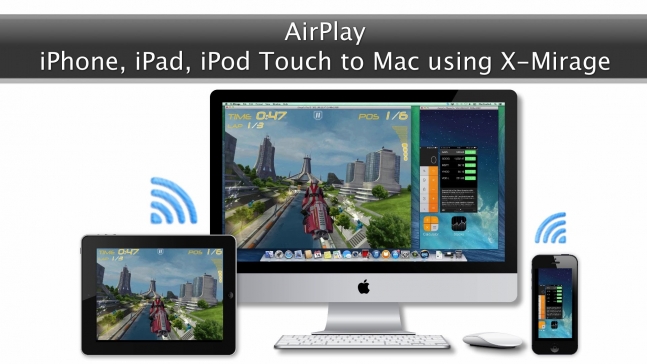
✨ Khám phá X-Mirage macOS, công cụ đắc lực giúp bạn dễ dàng trình chiếu và quay màn hình từ các thiết bị iOS lên máy Mac. Biến chiếc Mac của bạn thành một trung tâm giải trí và làm việc đa năng, nơi mọi nội dung từ iPhone, iPad đều được hiển thị sắc nét và mượt mà. 📱➡️💻
🌟 Với X-Mirage, bạn có thể:
* **Trình chiếu không dây:** Chia sẻ ứng dụng, trò chơi, ảnh, video hay bài thuyết trình từ thiết bị iOS lên màn hình lớn của Mac một cách tức thì. 🖼️
* **Quay màn hình chuyên nghiệp:** Ghi lại mọi thao tác, khoảnh khắc đáng nhớ hoặc tạo video hướng dẫn (tutorial) chất lượng cao chỉ với một cú nhấp chuột. 🎬
* **Trải nghiệm đa thiết bị:** Đồng thời phản chiếu màn hình từ nhiều thiết bị iOS lên một máy Mac duy nhất, lý tưởng cho các buổi chia sẻ hoặc chơi game cùng bạn bè. 👯♀️
* **Điều khiển media tiện lợi:** Tạm dừng, phát hoặc chuyển bài hát ngay trên Mac mà không cần chạm vào thiết bị iOS. 🎶
✅ **Yêu cầu phiên bản macOS:**
Để cài đặt và sử dụng X-Mirage macOS, máy tính của bạn cần chạy từ **macOS X Yosemite (10.10) trở lên**.
✅ **Cấu hình tối thiểu:**
* MacBook, iMac hoặc Mac mini chạy macOS 10.10 hoặc mới hơn.
* Kết nối Wi-Fi (802.11a/g/n) ổn định hoặc Ethernet.
* Thiết bị iOS tương thích.
🎁 Nâng tầm trải nghiệm của bạn với X-Mirage macOS ngay hôm nay! 🎉
X-Mirage – tương thích với iOS 9 và Mac OS X El Capitan. X-Mirage là ứng dụng chuyên nghiệp để hiển thị, trình chiếu màn hình iphone lên máy tính Mac hoặc Windows. Ứng dụng còn có chức năng quay phim và âm thành từ thiết bị iOS chỉ với 1 click
Mirror
Mirror the screen of your iPhone, iPad or iPod touch to your Mac or PC, wirelessly. AirPlay Mirroring makes it simple to project the screen of iOS devices to your computer.
Multiple devices
Mirror multiple iOS devices to one Mac or PC. You can name your computer to distinguish it from other AirPlay receivers. Invite your friends to mirror your favorite games to the same computer and compete with each other. Sharing has never been so easy.
One-click recording
Make demo videos, app design or showcasing, record lessons for students, record iOS games, iOS app tutorials. Whatever you do on your iOS devices can be recorded, then exported.
Mirroring. What you see on Mac/PC is what you show on iPhone, iPad or iPod.
X-Mirage turns your Mac and Windows PC into an AirPlay receiver for mirroring whatever on your iPhone, iPad or iPod screen – apps, games, photos, videos, presentations, websites and more to the bigger screen. X-Mirage receives AirPlay contents in full HD 1080p high-definition. Teachers can then mirror class material to computer, then to the projector, smartboard or HDTV while their fingers are moving on the iPad. Employees, businessmen just need to prepare presentations on any iPhone or iPad for mirroring to the Mac/PC when needed. For iOS app developers or designers, show your iOS app to the bigger computer screen for presentation to attract more people’s attention.
Streaming. Enjoy photos, movies and more on the bigger screen.
Vacation photos, treasured videos, beautiful music, AirPlay-enabled app, with X-Mirage, you can stream all these to your bigger Mac or Windows PC screen and you just need to sit back on the couch and enjoy the best visual and auditory effect from iOS devices on your Mac or PC. The media control bar allows you to play/pause, adjust volume, fast forward, fast backward, play next or previous directly on the Mac without picking the devices.
Real-time mirroring
Turn 1080p in amazing speed, taking airplay mirroring to the next level.
Password Protection
Create AirPlay password for your Mac to prevent unwanted users.
Stream Audio
Stream audio from an iOS device and enjoy it on Mac/PC.
Media Control
Change tracks or pause/play with the separate media control bar on Mac/PC.
What’s New Version 2.01.10:
Added compatibility with iOS 9
Requirements: Intel OS X 10.6 or later
Download